 INR
INR


How to Manually Add a WordPress Theme (Dashboard & FTP Guide)
WordPress powers millions of websites and is one of the most popular content management systems (CMS). One of the easiest ways to customize your website is by installing a theme.
In this guide, you’ll learn how to manually add a WordPress theme using two methods: via the dashboard and via FTP.
What is WordPress?
WordPress is a free, open-source CMS that allows you to create and manage websites without advanced coding knowledge. It provides a user-friendly dashboard to control your entire website.
With reliable hosting like WingsHoster, you can install WordPress in minutes and start building your site immediately.
Why Use WordPress?
- Free and open-source
- Beginner-friendly interface
- Thousands of themes and plugins
- SEO-friendly structure
- Fully customizable design
- Suitable for blogs, business sites, and eCommerce
Method 1: Install Theme via WordPress Dashboard
- Login to your WordPress admin panel (yourdomain.com/wp-admin)
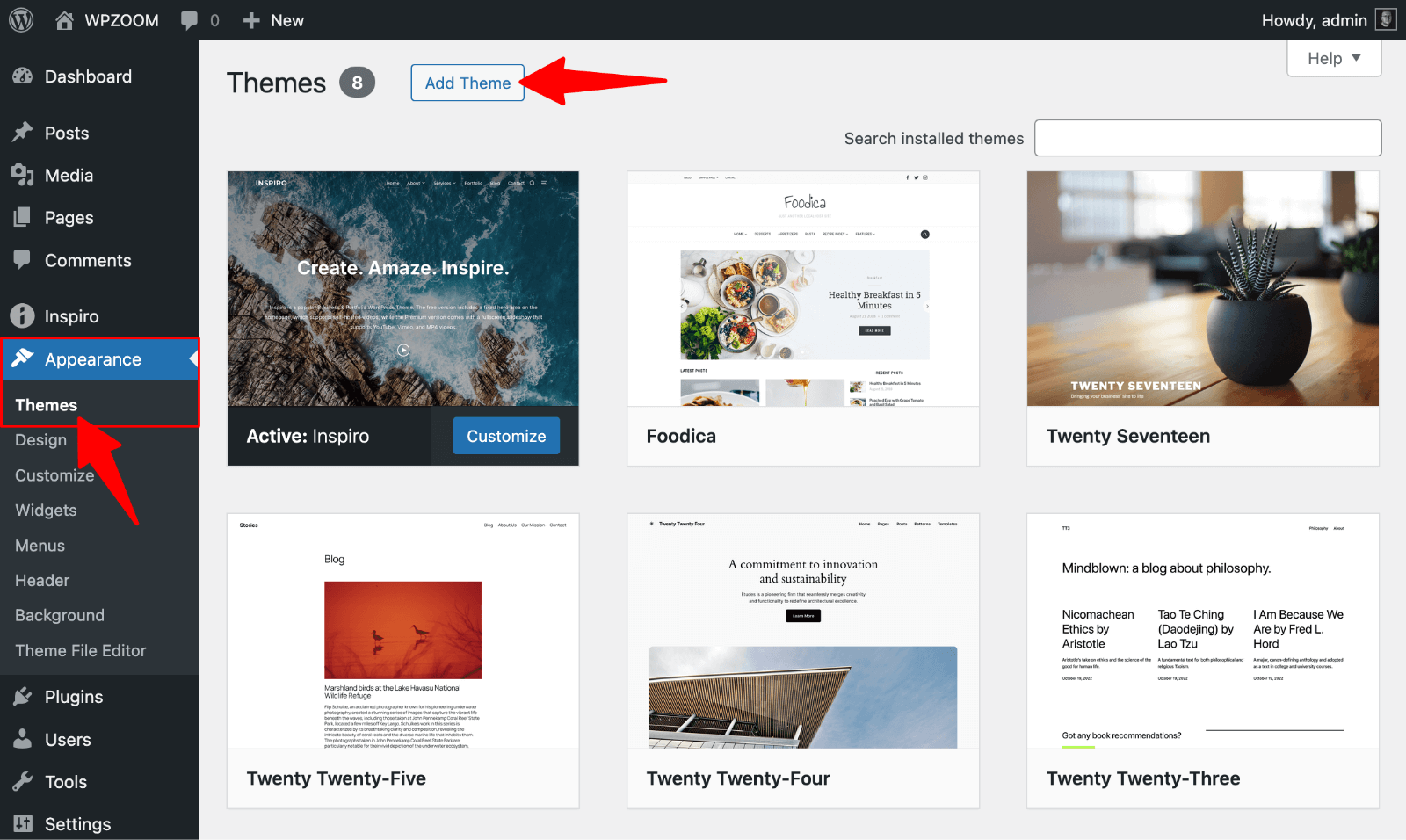
- Go to Appearance → Themes
- Click Add New
- Choose a theme or click Upload Theme
- Select your .zip theme file
- Click Install Now
- Click Activate
Tip: If you see “The link you followed has expired,” increase your PHP upload limit.
Method 2: Install Theme via FTP
- Download and extract your theme file
- Open an FTP client like FileZilla
- Navigate to /wp-content/themes/
- Upload the extracted theme folder
- Login to WordPress admin
- Go to Appearance → Themes
- Activate your theme
You can also upload the ZIP file using File Manager and extract it there.
Common Issues & Fixes
- Upload failed → Increase upload_max_filesize and post_max_size
- Theme not showing → Check folder structure
- Broken layout → Install required plugins
- White screen → Check PHP version and disable plugins
Conclusion
Installing a WordPress theme is simple once you know the right method. The dashboard method is best for beginners, while FTP is useful for larger files or advanced users.
Choose a reliable hosting provider like WingsHoster for smooth performance and easy WordPress management.