 INR
INR


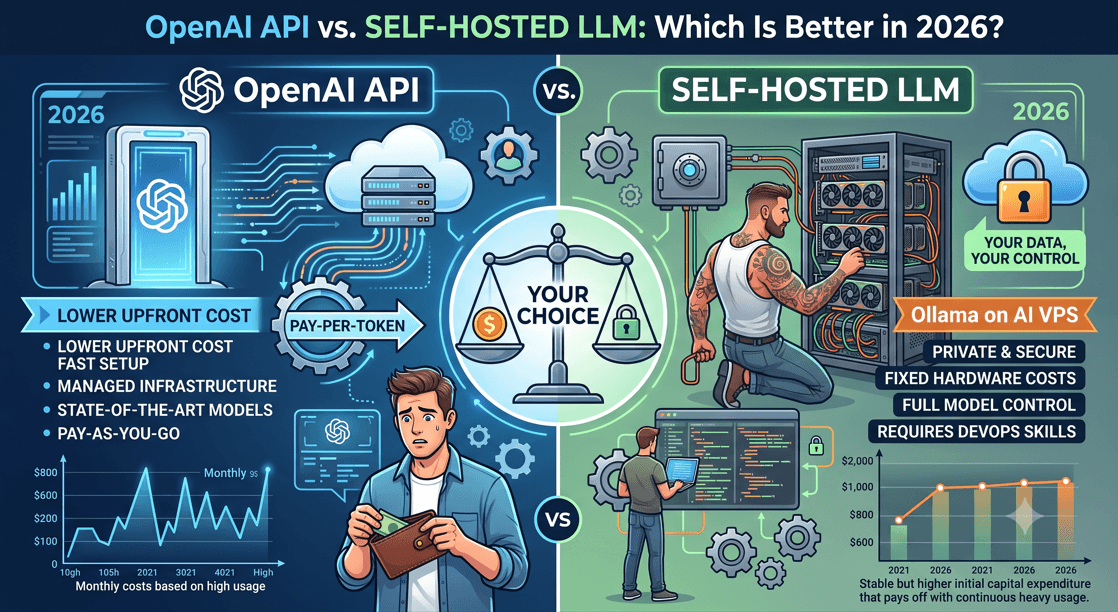
OpenAI API vs Self-Hosted LLM: Which Is Better in 2026?
Choosing between the OpenAI API and a self-hosted LLM is one of the biggest decisions AI teams and developers are facing right now. Get it right, and you save money, move faster, and keep your data where it belongs. Get it wrong, and you're either overpaying per token or wrestling with GPU servers that eat your weekends.
This guide is for developers, startup founders, and IT decision-makers who want a straight answer — not a sales pitch.
We'll break down the real cost difference between OpenAI API pricing and running a local LLM, compare performance across actual use cases, and help you figure out whether tools like Ollama on an AI VPS make more sense for your setup than paying per API call.
By the end, you'll know exactly which path fits your budget, your privacy needs, and your team's technical ability.
How OpenAI API Works in Practice
OpenAI API is essentially a gateway to some of the most powerful language models available today — GPT-4o, GPT-4 Turbo, and others — without you having to manage a single server or worry about model weights. You send a request, the model processes it on OpenAI's infrastructure, and you get a response back. That's it.
The mechanics are straightforward. You authenticate with an API key,
structure your prompt as a JSON payload, and send it to an endpoint
like
https://api.openai.com/v1/chat/completions. OpenAI handles everything behind the scenes — model loading,
inference compute, scaling, and uptime. Your app just talks to the API
and gets results.
Here's a simplified version of how a typical call works:
Authentication — Your API key is passed in the request header
Prompt construction — You send a structured message with roles (system, user, assistant)
Model selection — You specify which model you want (e.g.,
gpt-4o,gpt-3.5-turbo)Response handling — The API returns a JSON object with the generated text, token usage, and metadata
Billing — OpenAI tracks your token consumption and charges accordingly based on OpenAI API pricing tiers
For developers, this means you can go from zero to a working AI-powered feature in under an hour. No GPU server setup, no model configuration, no infrastructure headaches.
Key Features That Make It Popular
OpenAI API has become the default starting point for most AI projects for good reason. It's not just about raw model capability — it's the entire package that makes it genuinely hard to walk away from.
Ease of Integration
The API is REST-based, which means any language or framework can talk to it. Python, Node.js, Go, Ruby — it doesn't matter. OpenAI also provides official SDKs that make integration even faster.
Model Variety
You get access to a range of models for different budgets and performance needs:
Model | Best For | Relative Cost |
|---|---|---|
GPT-4o | Complex reasoning, multimodal tasks | Higher |
GPT-4 Turbo | Long-context tasks, detailed output | Higher |
GPT-3.5 Turbo | Fast, budget-friendly tasks | Lower |
Embeddings models | Semantic search, RAG pipelines | Very low |
Whisper | Speech-to-text | Per minute |
Multimodal Capabilities
GPT-4o can handle text, images, and audio in a single API call. This is something most self-hosted local LLM setups can't easily replicate without significant additional infrastructure.
Function Calling and Tool Use
OpenAI API supports structured function calling, which lets your application define tools the model can invoke — perfect for building agents that interact with external systems, databases, or APIs.
Fine-Tuning
You can fine-tune select models on your own datasets to customize behavior for specific tasks. This bridges some of the gap between off-the-shelf performance and domain-specific accuracy.
Reliability and Uptime
OpenAI operates at massive scale with enterprise-grade infrastructure. For businesses that can't afford downtime, this is a huge deal. You're not managing redundancy — they are.
Streaming Responses
The API supports streaming, so you can display text token by token as it's generated — giving users that familiar typewriter effect that feels more interactive and responsive.
Common Use Cases Across Industries
OpenAI API powers a wide range of applications across virtually every sector. The flexibility of the models makes it useful far beyond simple chatbots.
Software Development
Code generation and review tools (similar to GitHub Copilot)
Automated documentation writers
Bug triage assistants that analyze error logs and suggest fixes
Customer Support
Intelligent chatbots that handle complex, multi-turn conversations
Ticket classification and routing systems
Automated response drafting for support agents
Content and Marketing
Blog post drafting and SEO content generation
Ad copy variations for A/B testing
Product description generators for e-commerce platforms
Healthcare
Clinical note summarization
Patient intake form processing
Research literature review tools
Finance and Legal
Contract review and clause extraction
Financial report summarization
Compliance document analysis
Education
Personalized tutoring systems
Automated grading and feedback tools
Interactive Q&A learning platforms
AI Hosting and SaaS Products
A growing number of businesses use OpenAI API as the backbone for their own AI SaaS products. Instead of training or running their own models, they build on top of OpenAI's infrastructure — essentially using it as an AI hosting layer. This is especially common among startups that want to move fast without the overhead of managing a GPU server or dealing with the complexity of running a local LLM. If you're planning to deploy your own AI models, explore our AI VPS Hosting Plans.
The LLM comparison between hosted APIs and self-hosted setups often starts right here — the OpenAI API offers speed to market, broad capability, and minimal infrastructure work, which makes it the natural first choice for many teams. The trade-offs around cost, data privacy, and control become more relevant as products scale, which is exactly why the self-hosted AI conversation has been heating up throughout 2025 and into 2026.
What Is a Self-Hosted LLM?
A self-hosted LLM is an AI language model you run on your own infrastructure — whether that's a bare-metal server, a GPU server, or an AI VPS. Unlike cloud APIs, you control everything: the model weights, the data flowing through it, and the compute powering it.Ready to deploy your own AI infrastructure? Whether you need a GPU VPS, Serevr Management Plans, or fully managed server administration, WingsHoster provides scalable hosting designed for modern LLM workloads. Explore our AI Hosting Solutions today.
How Self-Hosted Models Are Deployed
Running a local LLM typically follows one of these paths:
On-premises hardware — physical servers with dedicated GPUs installed in your own facility
AI VPS or cloud GPU instances — rented GPU-equipped virtual servers where you deploy the model yourself
Edge devices — smaller quantized models running on local machines or workstations
The core idea is simple: the model runs where you decide, not on someone else's platform.
Popular Frameworks Used to Run Local LLMs
Several tools make self-hosted AI much easier to set up and manage:
Framework | Best For |
|---|---|
Ollama | Quick local LLM setup with minimal configuration |
LM Studio | Desktop-friendly GUI for running models locally |
vLLM | High-throughput production inference on GPU servers |
llama.cpp | Lightweight CPU/GPU inference for quantized models |
Text Generation WebUI | Feature-rich interface for experimenting with models |
Ollama has become a go-to pick for developers who want a fast, clean
way to spin up a local LLM without wrestling with complex
configurations.
Ease of Use and Integration
OpenAI API wins here, hands down. A few API keys, some HTTP calls, and you're running. Most frameworks like LangChain, LlamaIndex, and Flowise connect natively. Self-hosted options like Ollama require server setup, model pulling, and sometimes manual configuration — though the learning curve has dropped significantly in 2026.
Factor | OpenAI API | Self-Hosted LLM |
|---|---|---|
Setup Time | Minutes | Hours to days |
SDK Support | Extensive | Growing fast |
Maintenance | Zero | Ongoing |
Model Customization Capabilities
This is where local LLM setups shine. With self-hosted AI, you can fine-tune models on your own data, swap base weights, run LoRA adapters, and control every inference parameter. OpenAI offers fine-tuning on select models, but you're still working inside their sandbox with limited visibility.
If your use case needs domain-specific behavior — legal, medical, or proprietary knowledge — self-hosted gives you real control.
Update Frequency and Model Access
OpenAI pushes updates automatically, which sounds great until a silent
model change breaks your app. Self-hosted deployments on an
AI VPS or GPU server stay on whatever
version you choose — no surprises, full reproducibility. For production
stability, that predictability matters a lot.
OpenAI API Pricing Breakdown
OpenAI charges per token — both input and output. As of 2026, GPT-4o sits around $5 per 1M input tokens and $15 per 1M output tokens. For low-volume projects, that's manageable. But scale up to thousands of daily users and the bills climb fast.
Model | Input (per 1M tokens) | Output (per 1M tokens) |
|---|---|---|
GPT-4o | ~$5 | ~$15 |
GPT-3.5 Turbo | ~$0.50 | ~$1.50 |
GPT-4o Mini | ~$0.15 | ~$0.60 |
Total Cost of Ownership for Self-Hosted LLMs
Running a local LLM or self-hosted AI requires upfront hardware investment. A solid GPU server with an NVIDIA RTX 4090 or A100 can run $5,000–$20,000+. Alternatively, renting an AI VPS or GPU server through a hosting provider costs $100–$600/month depending on specs.
Other costs to factor in:
Electricity
Maintenance and updates
DevOps time for setup (especially with tools like Ollama)
When Self-Hosting Becomes More Cost Effective
Self-hosting wins when your monthly
OpenAI API pricing bill exceeds ~$300–$500. At that
point, a dedicated GPU server or AI hosting plan pays for itself within
months — with no per-token fees eating into your margins.
Response Speed and Latency Differences
OpenAI API typically returns responses in 1–3 seconds for standard requests, backed by OpenAI's globally distributed infrastructure. A self-hosted local LLM on a GPU server can be faster or slower depending entirely on your hardware.
Setup | Typical Latency | Dependency |
|---|---|---|
OpenAI API | 1–3s | Internet + OpenAI uptime |
Local LLM (GPU) | 0.5–5s | Your hardware specs |
AI VPS (cloud) | 1–4s | Provider reliability |
With Ollama running on a dedicated GPU server, latency drops significantly compared to CPU-only setups.
Accuracy and Output Quality at Scale
GPT-4o still leads on reasoning, instruction-following, and nuanced tasks. Open-source models like Llama 3.1 and Mistral have closed the gap considerably in 2026, especially for domain-specific fine-tuning where self-hosted AI actually wins.
Handling High-Traffic and Concurrent Requests
OpenAI API scales automatically — you pay per token and never touch infrastructure. Self-hosted setups require planning:
Single GPU: handles 5–20 concurrent requests depending on model size
Multi-GPU cluster: scales to production-level traffic
AI VPS with queuing: middle-ground option for growing teams
For high-traffic LLM comparison scenarios, OpenAI API wins on
convenience; local LLM wins on cost predictability at volume.
Minimum Specs to Run Popular Local LLMs
Running a local LLM isn't just plug-and-play — your hardware matters a lot. Here's what you actually need:
Model | Min RAM | VRAM (GPU) | Storage |
|---|---|---|---|
Llama 3 8B | 8GB | 6GB | 10GB |
Mistral 7B | 8GB | 6GB | 8GB |
Llama 3 70B | 64GB | 48GB | 40GB |
Mixtral 8x7B | 32GB | 24GB | 30GB |
Tools like Ollama make local deployment easier, but they can't work around inadequate hardware.
GPU vs CPU Hosting Tradeoffs
A GPU server dramatically cuts inference time — what takes 30 seconds on CPU might take under 2 seconds on a modern GPU. That said, CPU hosting works fine for lighter models when latency isn't critical.
GPU hosting: Fast inference, higher cost, ideal for production
CPU hosting: Slower, cheaper, good for testing or low-traffic apps
AI VPS options increasingly offer hybrid configurations
Scaling Hardware as Model Needs Grow
Start lean, then scale. Running a 7B model today doesn't mean you'll stay there. Plan your AI hosting infrastructure to support:
Additional VRAM via multi-GPU setups
RAM upgrades for larger context windows
NVMe storage for faster model loading
Best Self-Hosted LLM Models in 2026
Top Open-Source Models Worth Considering
Model | Parameters | Best For |
|---|---|---|
Llama 3.3 | 70B | General-purpose local LLM |
Mistral 7B | 7B | Fast, lightweight AI hosting |
Qwen 2.5 | 7B–72B | Multilingual tasks |
DeepSeek-R1 | 7B–671B | Reasoning & coding |
Phi-4 | 14B | Efficient on smaller GPU servers |
All of these run smoothly through Ollama, making self-hosted AI setup much simpler.
Choosing the Right Model Size for Your Hardware
7B models — run on 8GB VRAM (entry-level AI VPS)
13B models — need 16GB VRAM minimum
70B models — require high-end GPU servers with 40GB+ VRAM
671B models — demand multi-GPU clusters
Bigger isn't always better. A well-tuned 7B model often outperforms a bloated 70B one for specific tasks.
Specialized Models for Industry-Specific Needs
Legal/Finance: Phi-4 or Mistral fine-tuned variants
Coding: DeepSeek-Coder or CodeLlama
Healthcare: BioMistral
Customer support: Llama 3.3 with RAG pipelines
How to Evaluate Model Performance Before Deploying
Run benchmark prompts matching your real use cases
Measure token/second throughput on your actual hardware
Check hallucination rates using domain-specific question sets
Test latency under concurrent user load
On-Premise Servers vs Cloud-Based Self-Hosting
Both options work well for running a local LLM — the right pick depends on your budget and control needs.
Factor | On-Premise | Cloud-Based Self-Hosting |
|---|---|---|
Upfront Cost | High (GPU hardware) | Low (pay-as-you-go) |
Data Control | Full ownership | Depends on provider |
Scalability | Limited | Easy to scale |
Maintenance | Your team handles it | Provider manages infra |
Cloud-based AI hosting on a dedicated GPU server or AI VPS gives you flexibility without buying expensive hardware upfront. WingsHoster Cloud VPS plan
Containerization With Docker and Kubernetes
Running your self-hosted AI stack inside Docker containers keeps dependencies clean and portable. Tools like Ollama ship as ready-to-run Docker images, making deployment straightforward.
Kubernetes steps in when you need to scale across multiple nodes — handling load balancing, auto-restarts, and resource allocation automatically. For most small teams, Docker alone is enough to get started. Look WingsHoster Dedicated Server Plans
Storage and Memory Optimization for LLM Workloads
LLMs are memory-hungry. A few practical tips:
Use quantized models (GGUF format) to cut VRAM usage by 50–75%
Store model weights on fast NVMe SSDs to reduce load times
Set swap memory limits in Docker to prevent OOM crashes
Pin frequently used models in RAM if your server allows it
Final Verdict
Key Decision Factors Summarized
Factor | OpenAI API | Self-Hosted LLM |
|---|---|---|
Setup Time | Minutes | Hours to days |
Cost Model | Pay-per-token | Upfront hardware/server |
Data Privacy | Shared with OpenAI | Fully private |
Customization | Limited | Deep control |
Scalability | Instant | Requires planning |
Recommended Path Based on Business Size and Goals
Startups & small teams — OpenAI API gets you moving fast without worrying about GPU servers or model configs
Mid-size businesses handling sensitive data — A self-hosted AI setup on a dedicated AI VPS gives you privacy without massive infrastructure costs
Enterprises with high query volume — Running a local LLM like LLaMA or Mistral via Ollama cuts long-term OpenAI API pricing significantly
Developers experimenting — Start with the API, then migrate to self-hosted once you understand your actual usage patterns
Next Steps to Get Started With Your Chosen Approach
Going with OpenAI API?
Create an account, grab your API key, set spending limits
Going self-hosted?
Pick your model (Mistral, LLaMA, Gemma)
Choose an AI hosting plan with GPU support
Deploy using Ollama or vLLM
Test, benchmark, and scale
Pros and Cons
| OpenAI API | Self-Hosted LLM |
|---|---|
Pros
| Pros
|
Cons
| Cons
|
Conclusion
Choosing between OpenAI API and a self-hosted LLM really comes down to what matters most to your business right now. If you need something fast, flexible, and low-maintenance, OpenAI API gets you up and running without worrying about servers or model updates. But if data privacy, long-term cost savings, or full control over your AI stack are priorities, running your own LLM makes a lot of sense, especially with the strong open-source models available in 2026.
The good news is you don't have to figure out the infrastructure side alone. WingsHoster offers reliable, high-performance hosting solutions built to handle the demands of self-hosted AI models, so you get the power of a local LLM without the headache of managing everything from scratch. Take a look at what WingsHoster has to offer and find the setup that fits your goals.