 INR
INR


Best Hosting for AI SaaS Applications in 2026
Running an AI SaaS product on standard shared hosting is like trying to run a marathon in flip-flops. It technically works — until it doesn't.
If you're building or scaling an AI-powered product in 2026, finding the right ai app hosting setup is one of the most important decisions you'll make. This guide is written for AI startup founders, ML engineers, and technical product leads who need real answers — not generic "pick a cloud provider" advice.
Here's what we'll walk through together:
What makes AI workloads different and why regular hosting falls flat for LLM inference, model training, and generative AI pipelines
The hosting providers actually worth your money in 2026, covering everything from managed GPU servers to bare-metal machine learning server hosting options
How to match your hosting tier to your startup stage, so you're not overpaying on day one or hitting a wall at scale
We'll also cover the real cost traps people fall into with gpu vps hosting, and what a smooth migration looks like when you're ready to move your ai model deployment hosting to something more serious.
Unique Resource Requirements of AI Workloads
AI SaaS applications are fundamentally different animals compared to conventional web apps or even data-heavy enterprise software. When you spin up a standard SaaS product — say, a project management tool or a CRM — the hosting requirements are relatively predictable. You need enough CPU to handle requests, enough RAM to keep things snappy, and decent storage with reliable uptime. That's it. The resource curve is mostly linear and manageable.
AI workloads throw that entire playbook out the window.
The GPU Dependency Problem
The single biggest differentiator is the reliance on GPUs (Graphics Processing Units). Modern AI models — whether you're running inference on a large language model, processing images through a computer vision pipeline, or training a custom recommendation engine — are built on mathematical operations that GPUs handle orders of magnitude faster than CPUs.
A typical NVIDIA A100 GPU can perform around 312 teraflops of FP16 (floating-point 16-bit) operations per second. A high-end CPU might manage a few teraflops under the best circumstances. That gap isn't a minor inconvenience — it's the difference between a response that comes back in 200 milliseconds and one that takes 45 seconds. For a production AI SaaS product with paying customers, 45-second response times aren't a minor inconvenience either. They're a business-ending problem.
When you're shopping for gpu vps hosting or dedicated managed gpu server options, you need to understand the GPU landscape deeply:
NVIDIA A100 (80GB HBM2e): The gold standard for large-scale LLM inference and training. Excellent for multi-tenant AI workloads where memory bandwidth is critical.
NVIDIA H100 (80GB HBM3): The successor to the A100, with roughly 3x the performance for transformer-based workloads. If you're running GPT-4-class models or anything with attention mechanisms at scale, H100 clusters are where you want to be.
NVIDIA L40S: A newer option that balances inference performance with cost efficiency. Great for mid-tier AI SaaS products that don't need the raw power of an H100 but have outgrown consumer-grade GPUs.
NVIDIA RTX 4090 (consumer/prosumer): Sometimes found on cheaper gpu vps hosting platforms. Decent for lighter inference tasks or development workloads, but not built for sustained, high-availability production use.
AMD Instinct MI300X: AMD's serious push into AI infrastructure. Carries an enormous 192GB of HBM3 memory — which makes it interesting for very large model contexts — though ecosystem support still lags NVIDIA in some areas.
The choice of GPU isn't just about raw performance. Memory capacity matters enormously. Running a 70B parameter model in FP16 requires roughly 140GB of GPU VRAM just to load the model weights, before you process a single token. That means you're looking at multi-GPU configurations or high-memory cards like the MI300X. Running a 7B parameter model quantized to 4-bit might fit in 4-6GB of VRAM, which completely changes your infrastructure options. Your GPU selection has to match your specific model architecture and serving strategy.
Memory: The Hidden Bottleneck
People obsess over GPU compute when evaluating ai server hosting, but memory bandwidth is often the real bottleneck for inference workloads. During inference, the GPU spends a huge amount of time loading model weights from memory into compute units. If memory bandwidth is limited, your GPU compute is sitting idle waiting for data. This is why HBM (High Bandwidth Memory) on datacenter GPUs is such a big deal — an A100 delivers ~2TB/s of memory bandwidth, while a consumer GPU might offer 600-900GB/s.
For your AI SaaS application, this translates to:
Batching efficiency: Higher memory bandwidth lets you process larger batches of requests simultaneously, dramatically improving throughput.
Context length handling: Longer context windows (like processing a 100K token document) require enormous KV-cache memory. Without adequate memory bandwidth, latency spikes badly as context length grows.
Multi-tenant serving: If you're serving multiple customers from a shared GPU, memory bandwidth determines how many concurrent requests you can handle before quality degrades.
Beyond GPU memory, system RAM requirements for AI SaaS are also substantially higher than traditional apps. A modern LLM serving stack — including the model server (like vLLM or TGI), preprocessing pipelines, request queuing, and monitoring — can easily consume 32-64GB of system RAM before the model weights even enter the picture.
Storage: Fast I/O Is Non-Negotiable
AI model deployment hosting has a storage dimension that most hosting comparisons completely ignore. Model weights are large files — a 7B parameter model in FP16 is ~14GB, a 70B model is ~140GB, a 405B model pushes over 800GB. When your service scales horizontally or restarts after maintenance, those weights need to load from persistent storage into GPU VRAM as fast as possible.
If you're loading a 70B model from a traditional spinning HDD (sequential read speeds around 100-150MB/s), you're looking at a ~15-25 minute cold start. Even a standard SATA SSD at 500MB/s gives you 5-8 minutes. NVMe SSDs at 5-7GB/s bring that down to 20-40 seconds. For production ai app hosting, NVMe storage isn't a luxury — it's a baseline requirement.
There's also the question of storage architecture:
Local NVMe: Fastest for loading weights, but creates stateful infrastructure that's harder to scale and migrate. Explore More regarding How Securing VPS Servers
Network-attached NVMe (like AWS EBS GP3/io2, or Vast.ai's distributed storage): Slightly slower but enables much more flexible scaling. You can spin up a new inference node and have it serving traffic within minutes rather than re-copying hundreds of gigabytes.
Object storage with model caching: Some AI infrastructure platforms cache model weights in object storage (S3-compatible) and use local disk as a cache layer. This is cost-effective for less frequently used models but can hit you with latency on first load.
Network Throughput and Latency
AI SaaS applications often have unusual network requirements that don't show up in standard hosting spec sheets. A few scenarios worth understanding:
Multi-GPU inference: Running very large models across multiple GPUs requires high-speed interconnects. NVIDIA's NVLink provides ~600GB/s of GPU-to-GPU bandwidth. If your multi-GPU inference is happening across nodes (rather than within a single server), you need InfiniBand or high-bandwidth Ethernet (100GbE+) for the inter-node communication. Hosting providers that don't offer these interconnects will bottleneck your performance on large model serving.
Data ingestion pipelines: Many AI SaaS products involve preprocessing large amounts of customer data — documents, images, audio files. If your preprocessing happens server-side, you need enough inbound bandwidth to handle concurrent uploads without creating a pipeline stall.
Streaming responses: LLM-based applications typically stream tokens back to users rather than waiting for the complete response. This is actually more network-efficient (small, frequent packets) but requires low-latency connections to avoid visible stuttering in the user experience.
Compute Elasticity Requirements
Traditional SaaS apps scale primarily through CPU/RAM scaling — you add more app servers behind a load balancer, and you're done. AI SaaS applications have a much more complex scaling profile.
During off-peak hours, you might be running minimal inference traffic. But when a product gets featured somewhere or a marketing campaign lands, inference demand can spike 10-50x in minutes. GPU resources are expensive and can't be pre-provisioned in large quantities without burning significant money. This creates a fundamental tension:
Over-provision GPUs: Great for handling spikes, terrible for unit economics. You're paying for idle GPU time at $2-8/hour per GPU.
Under-provision GPUs: Great for cost optimization, terrible for user experience when demand spikes.
The solution most mature AI SaaS companies land on involves a combination of:
Baseline reserved GPU capacity for predictable steady-state traffic
On-demand GPU scaling through cloud providers or spot/preemptible instances
Request queuing and graceful degradation so users get a slightly slower experience during spikes rather than errors
Model optimization (quantization, distillation, caching) to squeeze more throughput from existing hardware
This complexity is exactly why hosting for ai startup companies needs to be thought about differently from day one. Choosing the wrong hosting architecture early creates compounding technical debt that gets exponentially harder to unwind as you scale.
How Traditional Hosting Falls Short for AI Apps
Standard hosting — whether that's shared hosting, traditional VPS, or even conventional bare-metal dedicated servers — was architected around CPU-centric workloads with relatively predictable resource consumption. The entire hosting industry spent 20+ years optimizing for this model. When AI workloads emerged as production requirements, most of that optimization became either irrelevant or actively counterproductive.
No GPU Access (The Obvious Gap)
The most immediate problem is that traditional hosting providers simply don't offer GPU instances. When you go to a standard VPS provider and look at their instance catalog, you'll find options organized by CPU cores and RAM. That's it. For running anything beyond a trivially small AI model, this is a non-starter.
Even providers that technically offer "GPU hosting" often bolt it on as an afterthought. You might get a single low-end GPU option (often an older NVIDIA Tesla card from a couple generations back) with limited configuration flexibility, no NVLink support, and no ecosystem tooling for AI workloads. This is completely different from purpose-built ai infrastructure hosting where the entire stack — hardware selection, networking, storage architecture, software environment — is designed around AI use cases.
The Software Environment Problem
Setting up the software environment for AI inference is genuinely non-trivial. You need:
Correct NVIDIA driver versions (mismatches cause cryptic errors)
CUDA toolkit installation and environment variable configuration
cuDNN for deep learning operations
Python environment with dozens of interdependent packages (PyTorch, Transformers, Accelerate, etc.)
Inference server software (vLLM, TensorRT-LLM, TGI, Triton Inference Server)
Model management and versioning tooling
Monitoring and observability instrumentation
Traditional hosting gives you a blank server and a root password. You're on your own for all of this. For a small hosting for ai startup team that's also trying to build product, maintain infrastructure, manage customers, and raise money, this is an enormous hidden cost.
Purpose-built AI hosting providers offer pre-built images, one-click model deployments, managed inference servers, and automatic environment management. This isn't just convenience — it's the difference between your AI engineers spending time on model optimization versus debugging CUDA driver compatibility issues at 2am.
Networking Architecture Mismatches
Traditional hosting networks were designed for request-response patterns with small payloads. API calls, database queries, HTML pages — none of these stress network architecture the way AI workloads do.
Consider what happens when you're running a machine learning server hosting setup for a computer vision application:
Users upload images (potentially large — 5-20MB each at high resolution)
The server preprocesses the image (CPU-bound but fast)
The preprocessed tensor gets moved to GPU memory
Inference runs on GPU
Results get returned (usually small JSON)
The upload step requires substantial inbound bandwidth. If multiple users are uploading simultaneously, you can saturate traditional hosting bandwidth allocations quickly. Many traditional VPS providers advertise "unmetered bandwidth" but throttle peak throughput, creating bottlenecks under real AI production load.
More critically, traditional hosting networks often have high latency characteristics that compound badly for streaming AI applications. A 10ms network RTT that's totally acceptable for a database query creates a visible stutter when you're streaming tokens at 20 tokens/second. Users perceive this as the AI "thinking" in visible chunks rather than smoothly generating text.
Thermal and Power Delivery Limitations
This is a hardware constraint that rarely gets mentioned in hosting comparisons but becomes very real at scale. GPUs consume enormous amounts of power and generate corresponding heat. An NVIDIA H100 has a 700W TDP. A server with 8x H100s is pulling 5,600W from the GPU cards alone, plus CPUs, networking, and storage. That's a server demanding ~8-10kW of power delivery and equivalent cooling.
Traditional datacenter infrastructure isn't built for this density. Standard server racks can handle ~5-10kW per rack for conventional servers. Purpose-built AI datacenters are designing for 50-100kW per rack (using liquid cooling solutions like direct liquid cooling or immersion cooling). When you try to run GPU-intensive AI workloads in a traditional hosting environment, you often hit thermal throttling — the GPUs automatically reduce their clock speeds to prevent overheating, which degrades your inference performance unpredictably.
Good ai server hosting providers invest heavily in datacenter power and cooling infrastructure specifically calibrated for high-density GPU deployments. This isn't visible to you as a customer day-to-day, but it's the difference between consistent 95th-percentile latency and wild performance swings that drive your SLA monitoring crazy.
Auto-Scaling That Doesn't Understand AI Workloads
Traditional cloud auto-scaling works by monitoring CPU utilization and adding/removing identical compute instances when thresholds are crossed. This works reasonably well for stateless web application tiers.
AI workloads have fundamentally different scaling signals:
GPU utilization (not CPU) is the primary scaling signal
Batch size and queue depth matter — you want to fill batches before scaling out, not immediately
Model loading time means new instances take 30 seconds to 10 minutes to become ready (far longer than a new Node.js server that starts in 2 seconds)
Request latency follows a non-linear curve — a GPU running at 60% utilization might serve requests in 150ms, but at 90% utilization, latency might jump to 2 seconds due to queuing effects
Traditional auto-scaling systems don't understand these dynamics. They'll often scale out too aggressively (wasting money) or scale in too quickly (causing request queuing and latency spikes). Specialized ai infrastructure hosting platforms build AI-aware autoscaling that accounts for GPU-specific metrics, batch optimization, and the slow startup times inherent in model loading.
The Economics of Traditional Hosting for AI
If you try to run a production AI SaaS product on conventional hosting infrastructure, you quickly discover that the economics don't work. Traditional VPS providers price based on CPU and RAM because those resources are interchangeable and cheap. GPU resources are neither.
A standard 4-core/8GB RAM VPS might cost $20-40/month. The equivalent GPU-equipped instance — necessary for any meaningful AI inference — starts at $200-500/month for entry-level GPU access and scales rapidly into thousands of dollars per month for production-grade inference hardware.
But the real economic problem isn't the base cost — it's the operational overhead. Traditional hosting forces you to manage:
GPU driver and CUDA updates (break things regularly if not handled carefully)
VRAM memory management and leak detection
Inference server tuning (batch sizes, queue lengths, timeout configurations)
Model versioning and A/B testing infrastructure
Custom monitoring for AI-specific metrics
Each of these requires specialized expertise. For an early-stage hosting for ai startup situation, you're either hiring expensive ML infrastructure engineers or your ML engineers are spending 40% of their time on infrastructure instead of models. Neither is good.
Compliance and Security Gaps
AI SaaS applications often handle sensitive data — customer documents, conversation histories, personally identifiable information fed into prompts. Traditional hosting providers offer standard compliance frameworks (SOC 2, HIPAA, ISO 27001) but often lack AI-specific security controls:
Prompt injection protections at the infrastructure level
Model exfiltration prevention (preventing unauthorized access to your fine-tuned model weights)
Inference isolation between tenants (ensuring one customer's requests can't influence another's model state)
Training data segregation for multi-tenant fine-tuning workflows
These aren't hypothetical concerns — they're active security considerations for any production llm hosting deployment. Purpose-built AI hosting platforms are beginning to address these through GPU-level virtualization, secure enclave options, and AI-specific access controls.
Key Performance Benchmarks to Prioritize
When you're evaluating ai app hosting or hosting for generative ai applications, the performance metrics that matter are fundamentally different from what you'd track for a standard web application. This section covers the metrics you need to be tracking, what good looks like, and why they directly impact your business outcomes.
Tokens Per Second (TPS): Your Primary Throughput Metric
For any LLM-based AI SaaS product, tokens per second is the headline throughput metric. It measures how many output tokens your inference infrastructure can generate per second, either for a single request or across all concurrent requests.
There are two flavors to understand:
Single-stream TPS: How fast the model generates tokens for a single, isolated request. This matters for real-time applications where individual user experience is critical.
Total throughput TPS: How many tokens per second the entire system generates across all concurrent requests. This is what determines your infrastructure's capacity and cost efficiency.
Here's a rough benchmark reference table for common models on different hardware configurations (these are approximate and vary based on quantization, batching strategy, and serving framework):
Model | Hardware | Single-Stream TPS | Max Throughput TPS (batched) |
|---|---|---|---|
Llama 3.1 8B (FP16) | 1x A100 80GB | 80-120 | 400-800 |
Llama 3.1 70B (FP16) | 2x A100 80GB | 25-45 | 150-300 |
Llama 3.1 70B (FP16) | 2x H100 80GB | 50-80 | 300-600 |
GPT-4-class (via API) | Provider-managed | 20-60 | N/A (per-request) |
Llama 3.1 8B (INT4) | 1x RTX 4090 | 60-90 | 200-400 |
Mistral 7B (FP16) | 1x A100 40GB | 70-100 | 350-700 |
These numbers matter because they directly determine the cost per response your product delivers. If you're paying $3/hour for GPU compute and generating 500 tokens per second in throughput, your compute cost per 1,000 tokens is roughly $0.001-0.002 — competitive with commercial APIs for high-volume applications.
Time to First Token (TTFT): The Perceived Latency Metric
TTFT measures how long after submitting a request before the first token appears in the response. For streaming applications, this is what users actually perceive as "responsiveness" — not how fast the complete response arrives.
Here's why TTFT deserves its own metric separate from total response time:
A user sends a question to an AI assistant
The system spends 800ms processing the request (prefilling the KV cache, scheduling the batch)
The first token appears
The model then streams at 60 tokens/second
The user's perception of speed is dominated by that initial 800ms pause. Even if the total response delivers in 3 seconds (perfectly reasonable for a 130-token response at 60 TPS), users experience the interaction as "slow" if TTFT is over 500ms.
Industry benchmarks for good TTFT by application type:
Chat/assistant applications: Under 300ms is good, under 150ms is excellent
Content generation tools: 500ms-1000ms is acceptable since users expect longer responses
Real-time voice applications: Under 100ms is required for natural conversation flow
Background processing tasks: TTFT is largely irrelevant — throughput matters more
TTFT is strongly influenced by:
Prompt length: Longer prompts require more prefill computation, directly increasing TTFT
System load: Under high concurrency, requests queue and TTFT increases
Hardware: H100s cut TTFT roughly in half compared to A100s for large prompts
Infrastructure location: Network latency from user to server adds directly to perceived TTFT
When evaluating managed gpu server offerings, always ask for P95 and P99 TTFT benchmarks under realistic load — not just average TTFT under zero load. A system that averages 150ms TTFT with a single concurrent user but blows out to 3000ms at 50 concurrent users isn't fit for production.
GPU Utilization and Memory Utilization
GPU utilization measures what percentage of the GPU's compute capacity is being actively used. This sounds like a simple metric, but it's deceptive for AI workloads.
High GPU utilization (80-95%) means your infrastructure is working hard and you're getting good value from expensive GPU resources. But GPU utilization has a non-linear relationship with latency. As utilization approaches 95-100%, the inference server's batch scheduler starts queuing requests, and tail latency (P95, P99) can explode dramatically.
A practical operating target for production ai infrastructure hosting is:
Average GPU utilization: 60-75% (leaves headroom for traffic spikes without latency degradation)
Peak GPU utilization: Under 85% (above this, tail latency starts climbing)
GPU memory utilization: 75-90% (higher is fine and reflects good memory management, but leave some headroom for KV cache expansion)
GPU memory utilization is actually a better proxy for capacity planning than compute utilization for inference workloads. If your GPU memory is at 90% capacity, you're close to hitting the memory wall — you won't be able to handle longer contexts or add more concurrent sessions without running out of VRAM, regardless of how much compute headroom you have.
Request Latency Percentiles: Don't Trust Averages
Average latency is almost useless as a production metric for AI SaaS. What you need to track obsessively are latency percentiles:
P50 (median): Half your requests complete faster than this
P95: 95% of requests complete faster than this
P99: 99% of requests complete faster than this
P99.9: 1 in 1,000 requests takes longer than this
The gap between P50 and P99 tells you everything about the consistency of your inference infrastructure. A system with P50 = 200ms and P99 = 8000ms is wildly inconsistent — users in that top 1% are having terrible experiences, and if you're serving 10,000 requests/day, you're delivering 100 terrible experiences per day.
What causes latency distribution tails in AI infrastructure?
Request queuing: When the inference server is full, requests queue. Queue position determines tail latency.
Context length variability: Longer context requests take much longer than short ones, creating high-percentile outliers.
Garbage collection: Python-based inference servers occasionally pause for GC, causing latency spikes.
Memory swapping: When GPU memory gets fragmented, the system may swap data, causing latency jumps.
Network jitter: In cloud environments, network conditions vary, affecting response delivery.
For production AI SaaS, a reasonable P99 latency target is 3-5x your P50 latency. If your median response time is 500ms, your P99 should ideally be under 2000-2500ms. If P99 is 10x+ your P50, you have a consistency problem that needs architectural attention.
Inference Throughput Under Concurrency
One of the most important benchmarks that almost nobody runs before choosing a ai model deployment hosting platform is measuring how performance degrades under increasing concurrency.
Run this test before committing to any AI hosting infrastructure:
Start with 1 concurrent request and measure TTFT and TPS
Increase to 5, 10, 25, 50, 100 concurrent requests
Track how TTFT, P95 latency, and total throughput change
A well-optimized inference setup on good hardware should show:
TTFT: Increases moderately (1.5-2x) from 1 to 50 concurrent requests, then more sharply
Total throughput TPS: Increases with concurrency until GPU saturation, then plateaus
P95 latency: Stays reasonable up to the saturation point, then climbs steeply
A poorly configured or under-resourced system will show:
TTFT that doubles or triples even at moderate concurrency (5-10 requests)
Total throughput TPS that doesn't improve with concurrency (wasted GPU compute)
P95 latency that becomes completely unpredictable
This benchmark is especially important for multi-tenant AI SaaS products where your single GPU instance serves requests from many different customers. If concurrency handling is poor, one customer with a batch of long documents can crater the experience for everyone else.
Cold Start Time
Cold start time measures how long it takes from "provision a new inference instance" to "serving live traffic." For AI workloads, this is dramatically longer than for conventional applications.
The cold start sequence for a typical LLM inference node looks like:
Instance boot: 30-90 seconds
Container pull and initialization: 1-3 minutes (if large AI container images aren't cached)
Python environment activation: 10-30 seconds
Model weight download/loading: 30 seconds to 20 minutes depending on model size and storage speed
Model compilation/optimization (if using TensorRT): 5-30 additional minutes
Warmup requests: 30-60 seconds
Total cold start for a 70B parameter model with TensorRT optimization can be 30-45 minutes. This completely changes your auto-scaling strategy — you can't rely on reactive scaling because by the time your new instance is ready, the traffic spike may be over.
When comparing llm hosting platforms, ask specifically:
What's the typical cold start time for models of your size?
Do they maintain warm pools of pre-initialized instances?
What's the minimum pre-provisioned capacity you can maintain affordably?
Do they support model weight pre-caching to accelerate restarts?
Some specialized platforms (like Replicate, Modal, or AWS SageMaker) offer warm pool mechanisms that keep a minimum number of instances in a "ready but idle" state, dramatically reducing effective cold start times at the cost of some baseline infrastructure expense.
Network Egress Latency and Throughput
For AI SaaS applications, the hosting provider's network position relative to your users has a bigger impact than for traditional web apps, for several reasons:
Token streaming: When streaming LLM responses, each token is a small packet. With token generation at 60 TPS, you're sending ~60 small packets per second per user. Accumulated network latency creates visible stuttering. A 50ms RTT between your server and a user means each token delivery takes at least 50ms additional time — at 60 TPS, this stacks up noticeably.
Multi-modal uploads: Image, audio, and document AI applications often require large file uploads before inference can begin. Your server's inbound bandwidth and the network path quality determine how fast preprocessing can start.
Real-time AI features: Voice-enabled AI assistants, real-time writing co-pilots, and interactive AI applications all have much tighter latency budgets than batch-processing workflows.
For ai app hosting serving a geographically distributed user base, this means:
Using content delivery networks (CDNs) for API response caching where possible (rare for generative AI, more applicable to embedding or classification endpoints)
Deploying inference in multiple regions to reduce geographic latency
Using anycast routing to direct users to the nearest inference endpoint
The best ai infrastructure hosting providers offer multi-region deployments with straightforward traffic routing, so you can serve US-East users from Virginia and EU users from Frankfurt without building complex multi-region infrastructure yourself.
Energy Efficiency and Performance Per Watt
This metric matters more than many AI SaaS founders realize, both for cost reasons and increasingly for sustainability commitments that enterprise customers care about.
H100 GPUs deliver approximately 3x the AI inference performance of A100s while consuming only ~40% more power, making them dramatically more efficient on a performance-per-watt basis. When your hosting bill is dominated by GPU costs (which it will be at scale), choosing hardware with better performance-per-watt directly translates to lower operational costs.
A practical comparison:
Metric | A100 80GB | H100 80GB | RTX 4090 |
|---|---|---|---|
LLM Inference TFLOPS | 312 TFLOPS FP16 | 989 TFLOPS FP16 | 330 TFLOPS FP16 |
TDP | 400W | 700W | 450W |
TFLOPS per Watt | 0.78 | 1.41 | 0.73 |
Approx. Cloud Cost/hr | $2.50-4.00 | $5.00-8.00 | $0.50-1.20 |
Cost Efficiency | Baseline | ~2x better | ~0.5x worse |
The cost per useful output token is what matters, not the headline hardware price. Despite H100s costing roughly twice as much per hour as A100s, you might get 3x the inference throughput — making H100s materially cheaper per token for compute-bound workloads.
Model Quality Metrics: Performance Beyond Speed
This is often overlooked in infrastructure evaluations but is critical for AI SaaS products. How you host and serve your models can directly affect the quality of outputs users receive.
Quantization impact: When you quantize model weights (reducing from FP16 to INT8 or INT4 to fit more on a GPU) you trade some output quality for compute efficiency. The quality degradation varies by model and quantization method. For customer-facing AI features, you need to measure your specific model's quality degradation at different quantization levels before deploying.
Batching effects on output quality: Dynamic batching — processing multiple requests together for efficiency — can sometimes affect output quality through subtle numerical effects. This is rare with modern inference frameworks but worth validating.
Thermal throttling and inconsistent performance: As mentioned earlier, inadequate cooling causes GPUs to thermal-throttle, reducing effective clock speeds. This directly degrades inference quality in a subtle way — you're not just getting slower outputs, you're getting outputs from a model running at reduced precision relative to its optimal performance point.
KV-cache management: In long-running conversations, how the inference server manages the KV cache (the saved state of previous conversation context) affects both quality and performance. A poorly managed KV cache can either truncate conversation context (degrading output quality) or exhaust GPU memory (causing crashes or severe slowdowns).
Availability and Reliability Metrics
Standard web hosting SLAs promise 99.9% uptime (about 8.7 hours of downtime per year). For AI SaaS products, you need to think about reliability differently because of the unique failure modes:
Failure Mode | Traditional Web App Impact | AI SaaS Impact |
|---|---|---|
Server restart | ~30 seconds downtime | 5-30 minutes downtime (model reload time) |
Hardware failure | Seconds with hot standby | Minutes to hours (replacing GPU nodes is complex) |
CUDA crash | N/A | Complete inference failure, requires restart |
GPU memory leak | N/A | Gradual performance degradation, eventually crash |
Model weight corruption | N/A | Silent quality degradation or hard failure |
AI-specific SLAs should include:
Model serving uptime: The percentage of time your inference endpoint is actively serving requests at full capacity
Inference latency SLA: A guarantee that P95 latency stays under a specified threshold (not just uptime)
Recovery time objective (RTO): How fast can the system recover from a GPU failure, CUDA crash, or node failure
Warm standby capacity: Is there pre-provisioned standby capacity to handle failover without a cold start delay
When evaluating hosting providers for machine learning server hosting, ask explicitly about AI-specific reliability guarantees. Most traditional hosting providers' SLAs simply don't address these failure modes. Good ai infrastructure hosting providers build redundancy specifically around GPU node failure, CUDA environment stability, and model serving consistency.
Benchmark Summary: What to Measure Before Committing to a Platform
Before signing a contract or deploying production workloads on any ai app hosting platform, run this performance validation checklist:
Throughput benchmarks:
Single-request TPS at baseline load
Total throughput TPS at 50% GPU utilization
Maximum throughput TPS at saturation
Latency benchmarks:
TTFT at 1, 10, 50 concurrent requests
P50, P95, P99 response latency at typical load
Latency under sustained peak load for 30 minutes
Reliability benchmarks:
Cold start time from zero to serving traffic
Recovery time after simulated GPU node failure
Latency behavior during auto-scaling events
Cost efficiency benchmarks:
Cost per 1,000 output tokens at typical load
Cost per 1,000 output tokens at peak load (including auto-scale overhead)
Idle cost (minimum spend when traffic is zero)
Network benchmarks:
Latency from your primary user geography to the hosting region
Available ingress bandwidth for large file uploads
Streaming latency consistency over a 10-minute continuous session
Running these benchmarks yourself, with your actual model and realistic request patterns, is the only way to make informed hosting decisions. Vendor-provided benchmarks are typically optimized for ideal conditions that don't reflect production reality.
Real production AI SaaS applications have variable prompt lengths, concurrent users with overlapping long-context requests, background batch jobs competing for GPU resources, and sudden traffic spikes. The hosting platform that performs best under these messy, realistic conditions — not in a controlled vendor demo — is the one that will actually serve your customers well.
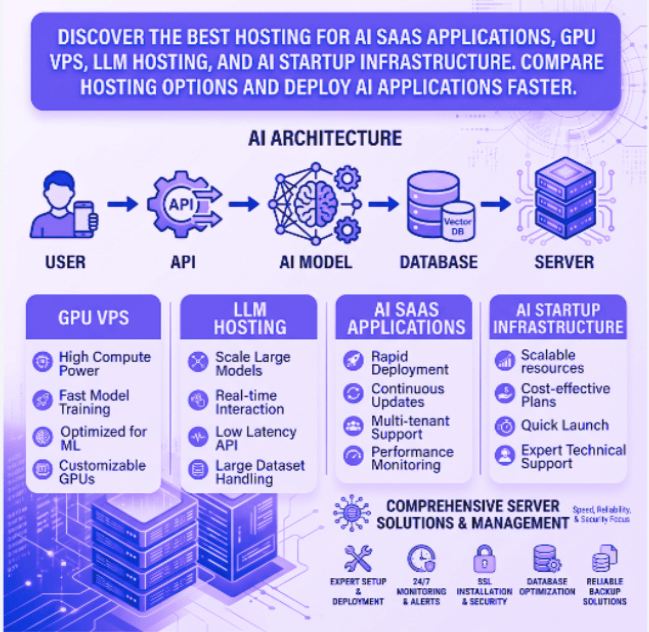
GPU VPS Hosting vs Standard VPS
Choosing between a standard VPS and GPU VPS depends on your workload.
A standard VPS is suitable for:
- AI API integrations
- ChatGPT-powered applications
- Automation platforms
- Business dashboards
- SaaS products using external AI services
GPU VPS hosting is recommended for:
- Running open-source LLMs
- Stable Diffusion
- Computer vision
- TensorFlow
- PyTorch
- Local AI inference
- Fine-tuning machine learning models
If your application performs intensive AI processing, GPU acceleration can significantly reduce execution time and improve overall efficiency.
Best Hosting Options for AI Startups
Linux VPS Hosting
Linux VPS is an excellent choice for AI developers using Python, Docker, TensorFlow, PyTorch, FastAPI, Node.js, and popular machine learning frameworks. here are our VPS Hosting
Benefits include:
- Flexible development environment
- Excellent Docker support
- Strong performance
- Cost-effective scaling
Windows VPS Hosting
Windows VPS is ideal for organizations developing AI solutions using Microsoft technologies such as .NET, SQL Server, IIS, or Windows-based enterprise software.
It also supports remote desktop access for teams that require a familiar Windows environment. here is our find our here Window VPS Plans
Dedicated Servers
Dedicated servers provide maximum computing resources for organizations hosting large AI platforms, high-traffic SaaS applications, or self-managed AI infrastructure.
Benefits include:
- Full hardware control
- Better security isolation
- Consistent performance
- Large storage capacity
- Enterprise scalability
Managed Server Hosting
Many AI startups prefer managed hosting so they can focus on building products instead of maintaining infrastructure.looking for dedicated server have a look WingsHoster Dedicated Servers
Managed services may include:
- Operating system updates
- Security hardening
- Firewall management
- Performance monitoring
- Backup management
- Server optimization
- Technical support
Choosing the Right Infrastructure
Before selecting a hosting provider, consider the following questions:
- Will you train models or only run inference?
- Do you require GPU acceleration?
- How much RAM will your application need?
- What is your expected monthly traffic?
- Will you deploy containers using Docker or Kubernetes?
- Do you need managed infrastructure?
Answering these questions helps determine whether a VPS, GPU VPS, or dedicated server is the best fit for your workload.
Final Thoughts
AI applications continue to demand faster, more scalable infrastructure as models grow in complexity. Selecting the right hosting environment can improve application performance, reduce operational costs, and provide a better experience for end users.
Whether you need a Linux VPS for AI development, Windows VPS for enterprise applications, dedicated servers for high-performance workloads, or fully managed infrastructure however we have dedicated team to handle Server management , choosing reliable hosting is a critical step toward building a successful AI SaaS platform.