 INR
INR


How to Secure a VPS Server in 2026: Complete Security Guides
Learn how to secure a VPS server in 2026 with our comprehensive
guide. Discover essential steps, from SSH hardening and firewalls to
DDoS protection and backups.
Virtual Private Servers (VPS) offer the perfect balance of
performance, scalability, and cost-effectiveness. However, with
great power comes great responsibility. Unlike shared hosting, a VPS
puts you in the driver’s seat when it comes to server management and
security.
As we navigate 2026, the threat landscape has evolved. AI-driven
automated attacks, sophisticated ransomware, and zero-day exploits
are more prevalent than ever. This comprehensive guide will walk you
through exactly how to secure a VPS server, ensuring your data,
applications, and users remain safe.
Why VPS Security Matters More Than Ever
In 2026, a compromised server doesn't just mean downtime; it can
lead to severe financial penalties, loss of customer trust, and
devastating data breaches. Cybercriminals are increasingly using
machine learning to scan the internet for misconfigured servers,
open ports, and outdated software Explore WingsHoster's NVMe VPS Hosting plans designed for websites, applications, businesses, and developers..
Securing your VPS is no longer just an IT best practice—it is a
fundamental business requirement. A robust security posture protects
your intellectual property, ensures compliance with modern data
privacy regulations, and keeps your applications running smoothly
without interruption.According to
OWASP (Open Worldwide Application Security Project), attackers frequently exploit weak passwords, outdated software,
and misconfigured servers. Following recognized security best
practices significantly reduces the risk of unauthorized access and
data breaches.
Keep Your Operating System Updated
The foundation of VPS security is a patched operating system.
Software vendors regularly release updates to fix known
vulnerabilities. If you delay these updates, you leave the door open
for attackers to exploit known weaknesses.The
Center for Internet Security (CIS)
publishes industry-recognized
CIS Benchmarks, which provide secure configuration guidelines for Linux
distributions, web servers, databases, and cloud environments.
Applying these recommendations helps reduce your server's attack
surface.Ubuntu users should regularly install security updates
published through
Ubuntu Security Notices (USN). These updates patch newly discovered vulnerabilities before
attackers can exploit them.
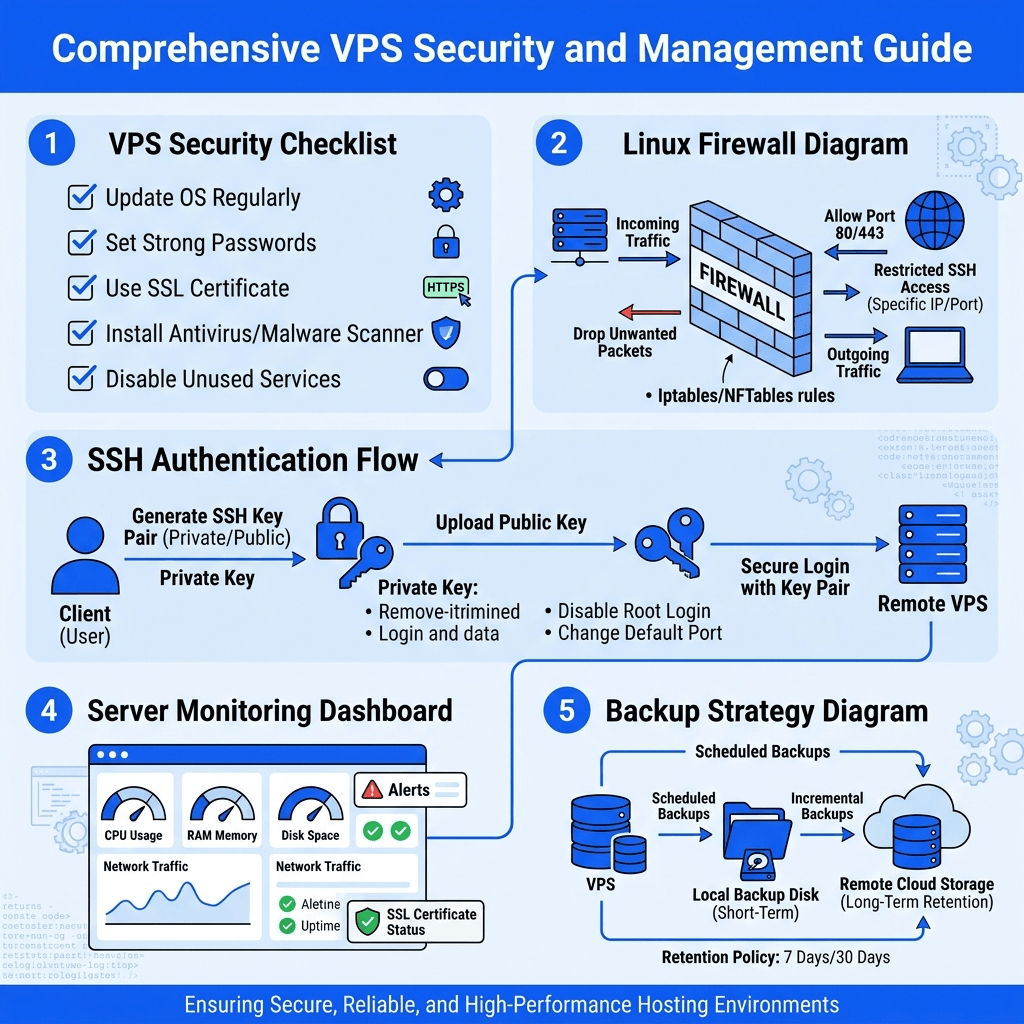
- Enable Automatic Security Updates: Configure your OS (Ubuntu, Debian, AlmaLinux, etc.) to automatically install critical security patches.
- Kernel Updates: Always reboot your server after a kernel update to ensure the new security patches are active.
- Remove End-of-Life (EOL) Software: Never run an operating system or software version that has reached its end of life, as it will no longer receive security patches.
Secure SSH Access
Secure Shell (SSH) is the primary way you interact with your VPS.
Because it provides root-level access, it is the most targeted
service by attackers. Hardening SSH is one of the most critical
steps in securing your server.
Disable Root Login
By default, many Linux distributions allow direct login via the
root
user. This is a massive security risk because attackers know the
username is "root" and only need to guess the password.Always create a standard user with
sudo
privileges for daily tasks. Edit your /etc/ssh/sshd_config file and set PermitRootLogin no. This forces attackers to guess both the username and the
password, exponentially increasing your security.Use SSH Keys Instead of Passwords
Password-based authentication is vulnerable to brute-force and
credential-stuffing attacks. In 2026, SSH key authentication is the
absolute standard.
Generate a strong cryptographic key pair (Ed25519 is currently the
recommended standard for its speed and security) and disable
password authentication entirely in your
sshd_config by setting PasswordAuthentication no.Change the Default SSH Port (Optional)
While changing the default SSH port (22) to a non-standard port is
"security through obscurity" and won't stop a determined hacker, it
significantly reduces the volume of automated bot traffic and log
spam. Choose a high, unused port (e.g., 49152) and update your
firewall rules accordingly.
Enable a Firewall
A firewall acts as a bouncer for your server, controlling incoming
and outgoing network traffic based on predetermined security
rules.
- Ubuntu/Debian:
Use UFW (Uncomplicated Firewall). Start by setting default
policies to deny incoming and allow outgoing (
sudo ufw default deny incoming,sudo ufw default allow outgoing). Only open the specific ports you need (like 80, 443, and your custom SSH port). - RHEL/AlmaLinux: Use
firewalldoriptables.
Never leave your firewall disabled, and always double-check that
your custom SSH port is allowed before enabling the firewall, or you
will lock yourself out!
Install Fail2Ban to Prevent Brute Force Attacks
Even with SSH keys and a custom port, bots will still attempt to
breach your server. Fail2Ban is an intrusion prevention software
framework that protects computer servers from brute-force
attacks.
It works by monitoring log files (like
/var/log/auth.log) for suspicious activity, such as multiple failed login attempts.
When it detects malicious behavior, it automatically updates your
firewall rules to temporarily or permanently ban the offending IP
address. Ensure you configure "jails" for SSH, Nginx, Apache, and
your mail server.Use Strong Passwords and Multi-Factor Authentication
If you must use passwords (for database users, control panels, or
FTP), ensure they are complex, long, and unique. Use a reputable
password manager to generate and store them.
Furthermore, implement Multi-Factor Authentication (MFA) wherever
possible. You can configure Linux PAM (Pluggable Authentication
Modules) to require a Time-based One-Time Password (TOTP) via an app
like Google Authenticator,Microsoft Authenticator or Authy when logging in via SSH or
accessing your web hosting control panel.
Disable Unused Services and Open Ports
Every running service on your VPS is a potential attack vector. If
you aren't using a service, turn it off.
Run the command
sudo ss -tulpn or sudo netstat -tulpn
to see which ports are currently listening. If you see services
running that you don't recognize or need (like an unused FTP server
or an old database instance), disable them and remove them from your
system. Follow the principle of least privilege: only expose what is
absolutely necessary.Install Malware and Antivirus Protection
A common myth is that Linux servers don't need antivirus software.
While Linux is inherently more secure than Windows, it is not
immune. If you host user-uploaded files, run a mail server, or share
files with Windows machines, malware can easily reside on your
VPS.
Install ClamAV
for on-demand scanning, or opt for a comprehensive hosting security
suite like Imunify360, which provides real-time malware scanning, automated cleanup, and
a Web Application Firewall (WAF) specifically designed for Linux
servers.
Secure Your Web Server
Your web server (Apache or Nginx) is the face of your applications.
Hardening it prevents unauthorized access and mitigates common web
exploits.
Apache Security Tips
- Hide Version Information:
Prevent attackers from knowing your exact Apache version by
setting
ServerTokens ProdandServerSignature Offin your config. - Disable Directory Listing: Ensure
Options -Indexesis set so users cannot browse your directories if anindex.htmlfile is missing. - Use ModSecurity: Deploy ModSecurity as a Web Application Firewall (WAF) to block SQL injection, cross-site scripting (XSS), and other OWASP Top 10 threats.
Nginx Security Tips
- Hide Server Tokens: Add
server_tokens off;to yournginx.confto hide the Nginx version number. - Implement Rate Limiting: Use
limit_req_zoneto prevent abuse and mitigate application-layer DDoS attacks. - Restrict Access by IP: Use
allowanddenydirectives to restrict access to sensitive areas like admin panels.
Enable SSL Certificates
In 2026, running a website without HTTPS is unacceptable. SSL/TLS
certificates encrypt the data transmitted between your server and
your users' browsers.Protect your website with our
SSL Certificates Plansor use Let's Encrypt for free SSL certificates.
- Use Let's Encrypt for free, automated SSL certificates.
- Deprecate older protocols: Disable TLS 1.0 and 1.1. Enforce TLS 1.3 as the minimum standard, as it offers superior security and performance.
- Enable HSTS (HTTP Strict Transport Security) to force browsers to only interact with your server via HTTPS.
Protect Your Database
Databases hold your most valuable asset: your data. Whether you are
using MySQL, MariaDB, or PostgreSQL, follow these rules:
- Bind to Localhost:
Configure your database to only listen on
127.0.0.1(localhost) unless remote access is strictly required. - Disable Remote Root Login: Never allow the database root user to connect from a remote IP.
- Use Strong Credentials: Create specific, limited-privilege database users for each application.
- Change Default Ports: Consider changing the default MySQL (3306) or PostgreSQL (5432) ports to reduce automated scanning.
Configure Automatic Backups
Security isn't just about preventing attacks; it's about recovering
when they happen. If your server is compromised, corrupted, or
suffers a hardware failure, backups are your lifeline.
Whether you're launching a small website, hosting business
applications, or managing enterprise workloads,
WingsHoster offers
both
managed and unmanaged
VPS hosting, high-performance
Windows VPS hosting, and powerful
dedicated server
solutions across multiple global data center locations. If you
prefer to focus on your business instead of server administration,
our experienced engineers also provide comprehensive
Server Management Plans, including server hardening, security updates, performance
optimization, proactive monitoring, backups, and technical support.
Whether you're a developer, business owner, or reseller, we have
flexible hosting and management solutions tailored to your
requirements.
- Follow the 3-2-1 Backup Rule: Keep 3 copies of your data, on 2 different media types, with 1 stored offsite.
- Use tools like
rsync,BorgBackup, or your hosting provider's backup tools to automate daily or weekly snapshots. - Test your restores: A backup is useless if you can't restore it. Regularly test your backup files to ensure data integrity.
Monitor Your Server Continuously
You cannot secure what you cannot see. Continuous monitoring helps
you detect anomalies, resource spikes, and potential security
breaches in real time.
Use monitoring tools like Prometheus, Grafana, Zabbix, or Datadog
to track CPU, RAM, disk I/O, and network traffic. Set up alerts to
notify you via email or Slack if a service goes down or if there is
an unusual spike in outbound traffic (which could indicate a
compromised server sending spam).
Implement DDoS Protection
Distributed Denial of Service (DDoS) attacks aim to overwhelm your
server with traffic, taking your applications offline. While a
firewall helps, it cannot absorb massive volumetric attacks.
Route your traffic through a Content Delivery Network (CDN) like Cloudflare, AWS Shield, or your hosting provider's network-level DDoS protection
to absorb and mitigate layer 3 and layer 4 DDoS attacks.
Additionally, ensure your hosting provider offers network-level DDoS
mitigation to filter out malicious traffic before it even reaches
your VPS.
Use Security Headers for Websites
Security headers instruct the user's browser on how to handle your
content, mitigating client-side attacks like XSS and clickjacking.
Implement the following headers in your web server
configuration:
- Content-Security-Policy (CSP): Prevents unauthorized scripts from loading.
- X-Frame-Options: Prevents your site from being embedded in iframes (stops clickjacking).
- X-Content-Type-Options: Prevents browsers from MIME-sniffing a response away from the declared content type.
- Referrer-Policy: Controls how much referrer information is shared when users navigate away from your site.
Audit Logs Regularly
Logs are the black box of your server. They record every login
attempt, error, and system event. Regularly auditing your logs helps
you identify suspicious behavior before it turns into a full-blown
breach.
Pay special attention to
/var/log/auth.log (or /var/log/secure
on RHEL-based systems) for SSH anomalies, and your web server
access/error logs for suspicious HTTP requests. Use log management
tools to centralize, parse, and alert on log data.Security Checklist for VPS Servers
Use this quick checklist to verify your VPS security posture:
- OS and software are fully updated.
- Root login via SSH is disabled.
- SSH key authentication is enabled; password auth is disabled.
- Firewall (UFW/Firewalld) is active with a default-deny policy.
- Fail2Ban is installed and configured.
- Unused services and ports are closed.
- Web server (Apache/Nginx) is hardened and hiding version info.
- SSL/TLS 1.3 is enforced with HSTS.
- Databases are bound to localhost and secured.
- Automated offsite backups are configured and tested.
- Server monitoring and alerting are active.
Common VPS Security Mistakes to Avoid
- Ignoring Updates: Thinking "if it ain't broke, don't fix it" leaves you vulnerable to known exploits.
- Using Weak Passwords: Reusing passwords or using simple dictionary words is an invitation for hackers.
- Leaving Default Configurations: Default settings are designed for ease of use, not security. Always harden default configs.
- No Backup Strategy: Relying solely on prevention without a recovery plan is a critical failure point.
- Running as Root: Performing daily tasks or running web applications as the root user gives attackers total control if a vulnerability is exploited.
How WingsHoster Helps Keep Your VPS Secure
Managing VPS security can be complex, but you don't have to do it
alone. At WingsHoster, security is built into the foundation of our infrastructure. When
you host your VPS with us, you benefit from:
- Enterprise-Grade DDoS Protection: Our network automatically detects and mitigates volumetric DDoS attacks, keeping your server online even under heavy assault.
- Automated Offsite Backups: We offer seamless, automated backup solutions so your data is always safe and easily restorable.
- Secure Infrastructure: Our data centers feature 24/7 physical security, biometric access, and redundant power and network connections.
- Instant OS Deployment: Deploy the latest, fully patched versions of Ubuntu, Debian, AlmaLinux, and more with a single click.
- 24/7 Expert Support: Our technical team is always on standby to help you troubleshoot firewall rules, configure SSL, or resolve any security-related issues.
With WingsHoster VPS Plan, you get the
root access and flexibility of a VPS, backed by the robust security
and reliability of a premium managed hosting environment.
Final Thoughts
Securing a VPS server in 2026 requires a proactive, multi-layered
approach. By hardening SSH, configuring firewalls, keeping software
updated, and implementing robust backup and monitoring strategies,
you can drastically reduce your attack surface.
Remember, security is not a one-time setup; it is an ongoing
process. Stay informed about the latest threats, regularly audit
your configurations, and never hesitate to seek expert help when
needed.
Looking for a secure, high-performance VPS? Whether you need Managed VPS Hosting, Unmanaged VPS Hosting, Windows VPS Hosting, Dedicated Servers, or a complete Server Management Plan, WingsHoster offers scalable solutions backed by NVMe SSD storage, global data centers, enterprise-grade security, and 24/7 technical support. Explore our hosting plans today and build your next project on a secure foundation. Explore WingsHoster Managed & Unmanaged VPS Hosting Plans
and let us help you build a secure, scalable foundation for your
digital projects.