 INR
INR


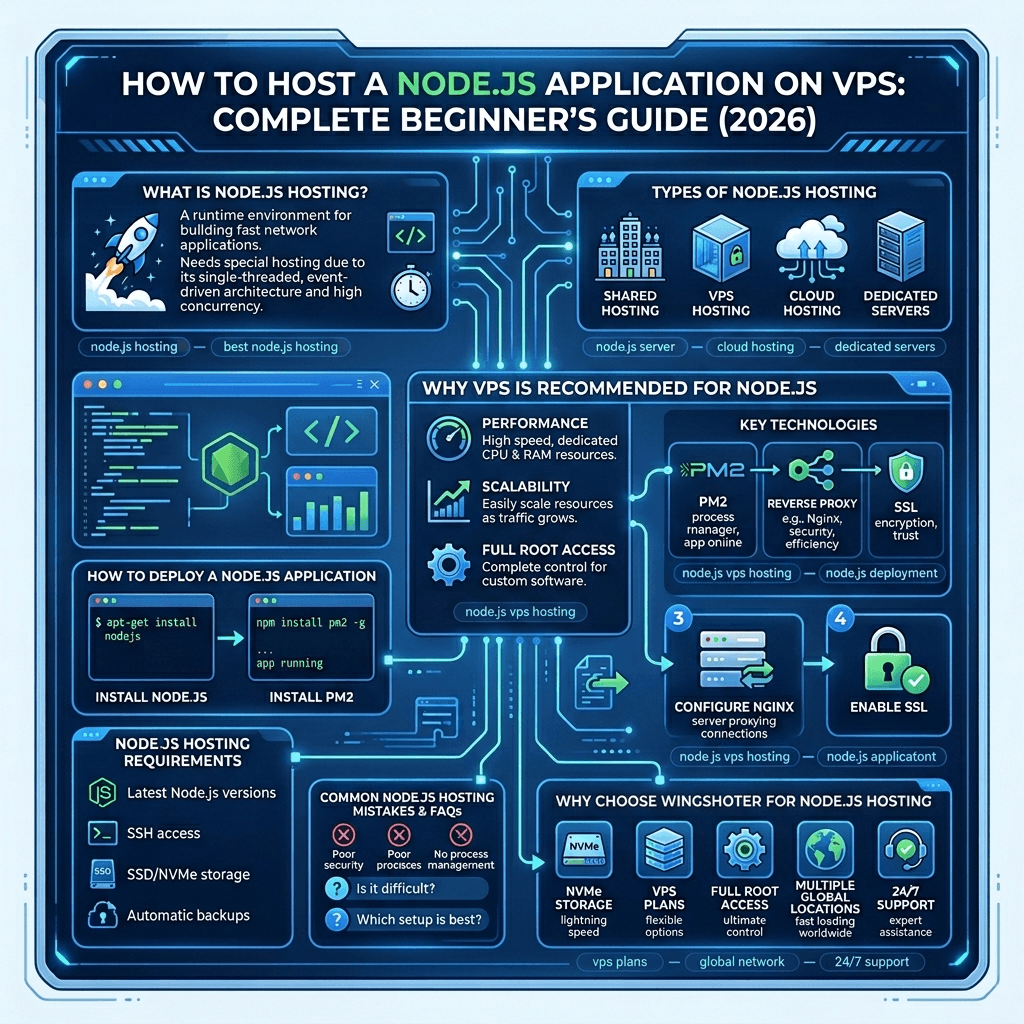
How to Host a Node.js Application on a VPS: Complete Beginner's Guide (2026)
Learn how to host a Node.js application on a VPS using PM2, Nginx, SSL, and modern deployment practices. This guide covers everything from choosing the right hosting environment to running a production-ready Node.js server.
What is Node.js Hosting?
Node.js hosting refers to running a Node.js application on a server environment capable of supporting long-running processes, handling incoming HTTP requests, and providing the resources required to keep your application online 24/7.
Unlike traditional PHP hosting, Node.js applications run as persistent processes and typically require a VPS or cloud server with full control over the environment.
What is Node.js?
Node.js is an open-source JavaScript runtime built on Google's V8 engine that allows developers to run JavaScript on the server side.
- Event-Driven Architecture – Ideal for APIs and real-time applications.
- Non-Blocking I/O – Handles thousands of concurrent connections efficiently.
- Persistent Processes – Applications stay active and listen on dedicated ports.
Why Node.js Requires VPS Hosting
Node.js applications differ from traditional websites because they require continuous background processes.
- Persistent application processes
- Custom Node.js runtime versions
- PM2 process management
- Nginx reverse proxy configuration
- SSL certificate management
For these reasons, a VPS Hosting Plan is generally the best option.
Types of Hosting for Node.js Applications
Shared Hosting
Shared hosting is inexpensive but often lacks support for persistent Node.js processes.
Explore WingsHoster Shared Hosting Plans
VPS Hosting
VPS hosting offers dedicated resources, SSH access, root privileges, and complete control over your environment.
View WingsHoster VPS Hosting Plans
Cloud Hosting
Cloud hosting provides scalable resources and flexible infrastructure for growing applications.
Explore WingsHoster Cloud Hosting
Dedicated Servers
Dedicated servers deliver maximum performance and isolation for large-scale workloads.
Why VPS Hosting is Recommended for Node.js
For most developers, startups, and SaaS applications, VPS hosting offers the ideal balance of performance, affordability, and flexibility.
- Full root access
- Dedicated CPU and RAM
- Custom software installation
- Advanced security controls
- Scalable infrastructure
WingsHoster's NVMe VPS Hosting provides the performance required for modern Node.js applications.
Production Essentials for Node.js Hosting
PM2 Process Manager
PM2 keeps your application running continuously, restarts failed processes automatically, and simplifies log management.
Nginx Reverse Proxy
Nginx handles incoming traffic, SSL termination, caching, compression, and forwards requests to your Node.js application.
SSL Certificates
HTTPS protects user data and improves SEO rankings.
Secure Your Website with SSL Certificates
Performance Optimization
- Use NVMe storage
- Enable HTTP/2
- Enable Gzip compression
- Use PM2 cluster mode
Scalability
Scale vertically by upgrading VPS resources or horizontally by deploying multiple application instances behind a load balancer.
How to Deploy a Node.js Application on a VPS
Step 1: Install Node.js
Connect to your VPS using SSH and install the latest Node.js LTS version.
Step 2: Install PM2
Install PM2 globally and configure startup scripts to ensure your application automatically restarts after reboots.
Step 3: Configure Nginx
Set up Nginx as a reverse proxy and route traffic to your application port.
Step 4: Enable SSL
Install Let's Encrypt certificates and enable HTTPS for secure communication.
Node.js Hosting Requirements
- Latest Node.js versions
- SSH access
- Root privileges
- NVMe storage
- Automatic backups
- 2–4GB RAM minimum
Common Node.js Hosting Mistakes
- Running applications directly with node app.js
- Skipping PM2
- Not using a reverse proxy
- Ignoring SSL certificates
- Underestimating resource requirements
- Not creating backups
Best Node.js Hosting Options Compared
| Hosting Type | Recommended? | Best For |
|---|---|---|
| Shared Hosting | ❌ No | Static websites |
| VPS Hosting | ✅ Yes | Most Node.js apps |
| Cloud Hosting | ✅ Yes | Scaling startups |
| Dedicated Server | ✅ Large apps | Enterprise workloads |
Recommended VPS for Node.js
Starter
- 2 vCPU
- 4 GB RAM
- 80 GB NVMe SSD
Growing Apps
- 4 vCPU
- 8 GB RAM
- 160 GB NVMe SSD
Production
- 8 vCPU
- 16 GB RAM
- 320 GB NVMe SSD
Why Choose WingsHoster for Node.js Hosting?
Ultra-Fast NVMe Storage
Enterprise-grade NVMe storage delivers exceptional performance for modern applications.
Developer-Friendly VPS Plans
Our VPS plans are optimized for Node.js, Next.js, Express.js, NestJS, and other JavaScript frameworks.
Full Root Access
Install custom software, Docker containers, PM2, CI/CD pipelines, and advanced monitoring tools.
Global Data Centers
Deploy applications closer to your users for lower latency and faster response times.
Expert Technical Support
Our experienced team is available to help with server configuration, deployment, and troubleshooting.
Ready to Launch Your Node.js Application?
Deploy your application on high-performance NVMe VPS infrastructure with full root access, enterprise-grade hardware, and support.